Hold
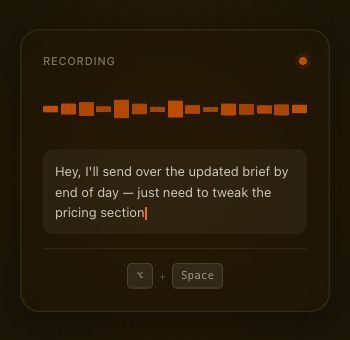
Press your global shortcut from any Mac app. Murmur locks the starting app and text field as the destination.
⌥+Space
Private voice-to-text for Mac
Talk through the messy first draft. Keep it on your Mac.
Hold a shortcut, speak, then release. Text appears in the field where you started.
Private alpha · Invitations open
A smaller workflow
Murmur stays out of the way until you need it. No chat window, prompt box, or cloud round trip.
Press your global shortcut from any Mac app. Murmur locks the starting app and text field as the destination.
Say the unfinished version. Audio is captured in memory and processed by a local Whisper model.
Your transcript is pasted only if the original app and focused text field are still active.
An explicit boundary
Murmur does not upload recorded audio or generated transcripts. Model downloads and update checks are explicit actions you start. After a paste, the destination app may save or sync your text. Read the full privacy boundary.
Processed in memory, with no recording history.
Never uploaded by Murmur. Your destination app may sync it.
Network access happens only after a user-initiated action.
No usage tracking is built into the alpha app.
Language stays language
Choose a multilingual model to detect English or Dutch on your Mac. Murmur transcribes in the spoken language. English-only models support English only.
Auto-detect · English & Dutch
“Kun je de bijgewerkte versie van het voorstel vanmiddag sturen?”
Made for unfinished thinking
Draft notes, briefs, and replies without routing spoken details through a transcription account.
Talk through the version that is not ready for a shared document, workspace, or AI service.
Capture private messages and half-formed ideas in the app where they belong.
Before you join
Yes, after you download a model. Transcription runs on your Mac. Model downloads and Check for Updates require a connection and start only when you choose them.
An Apple Silicon Mac running macOS 14 or later, microphone permission, and a downloaded model. Accessibility permission enables global push-to-talk and pasting. See setup and availability.
Murmur uses macOS Accessibility to paste into the original text field. Some apps or secure fields may prevent it. If the destination changes, the transcript stays in Murmur for manual copy.
Not yet. Alpha invitations will include a verified build and installation instructions. There is no public release in the update feed today.
Paid pricing has not been announced. This first testing group is about reliability, privacy, and understanding the workflows worth building for.
Private alpha
Join the first group of privacy-aware Mac users. Request an invitation below; we will email you when a verified build and a testing slot are ready.